Nirmata Enterprise for Kyverno Pay-as-you-Go
Overview
Nirmata Enterprise for Kyverno is an enterprise distribution of Kyverno available via the AWS Marketplace. This add-on provides 0-CVEs, secure defaults, and operational enhancements - deployable directly to your Amazon EKS clusters.
Prerequisites
- Active AWS account and Amazon EKS cluster (v1.23+)
- AWS CLI, kubectl, and eksctl installed and configured
- IAM permissions to create roles and service accounts
Installation via AWS Console
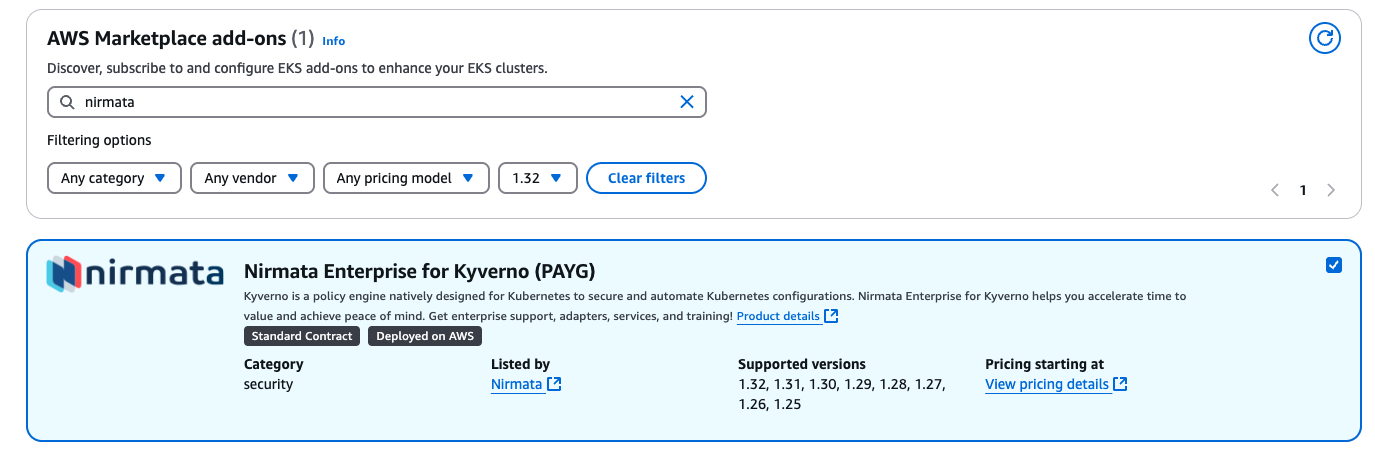
Select Nirmata Enterprise for Kyverno Add-on
- Go to Clusters>Add-ons tab and click on
Get more add-ons. - Scroll down to AWS Marketplace add-ons
- In the search bar, type
nirmata - Select
Nirmata Enterprise for Kyverno (PAYG). - Click on Next.
Configure Nirmata Enterprise for Kyverno Add-on
- In the
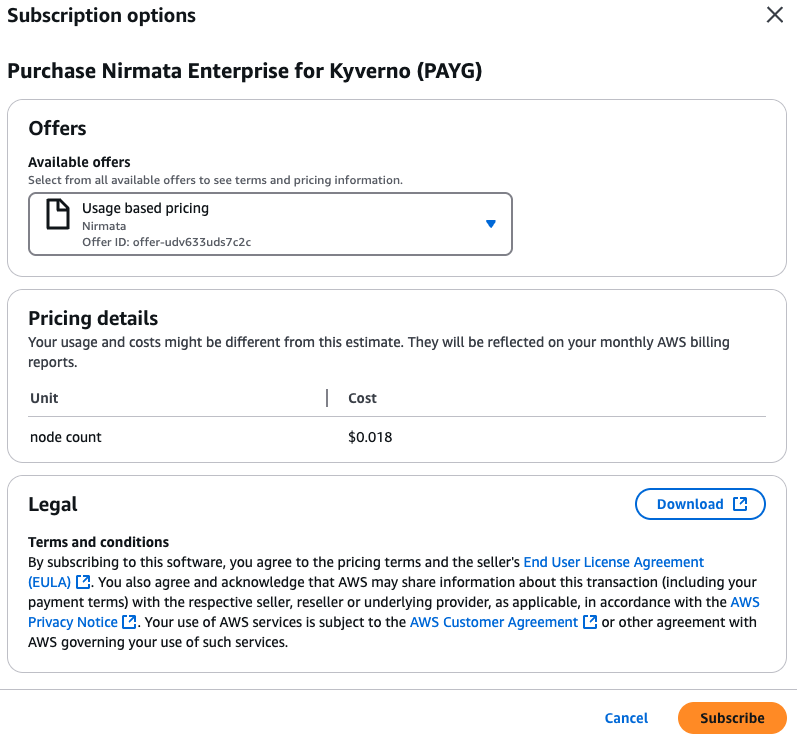
Configurestep, if not already subscribed to Nirmata Enterprise for Kyverno from your cloud account, under the Status field, you will see aRequires subscriptionmessage. - Click on
View Subscription optionsand follow the instructions for subscription.
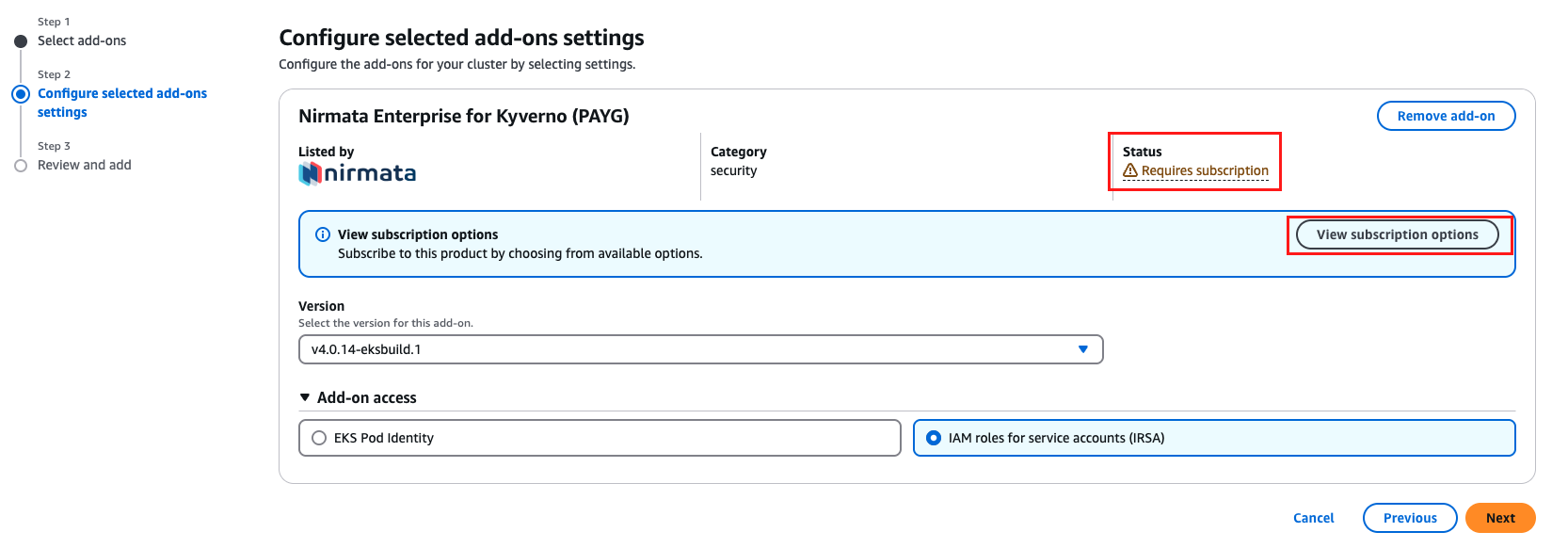
- The add-on requires access to AWS Metering APIs. Select
IAM roles for service accounts (IRSA).
NOTE: You must use the IRSA option and not Pod Identity as there will be issues in hitting the metering APIs resulting in errors in the Kyverno controller pods.
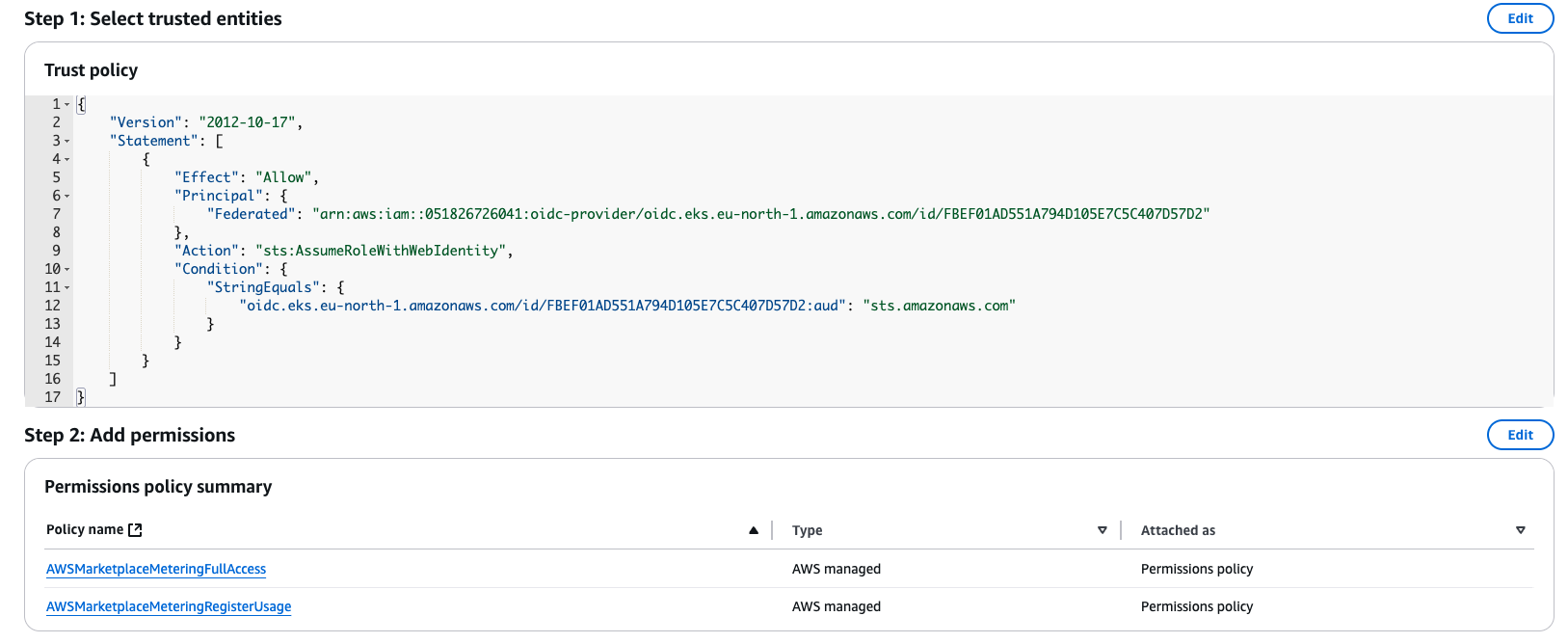
- Create the IAM Role with the following trust relationship policy and permissions.
- Go to IAM>Roles>Create role.
Select Custom trust policy:
NOTE: Refer to the cluster’s OpenID Connect provider URL to add in the trust relationship.
{
"Version": "2012-10-17",
"Statement": [
{
"Effect": "Allow",
"Principal": {
"Federated": "arn:aws:iam::<ACCOUNT_NUMBER>:oidc-provider/<oidc.eks.<REGION>.amazonaws.com/id/XXXX>"
},
"Action": "sts:AssumeRoleWithWebIdentity",
"Condition": {
"StringEquals": {
"oidc.eks.<REGION>.amazonaws.com/id/XXXX:aud": "sts.amazonaws.com"
}
}
}
]
}
```text
Add Permissions:
* AWSMarketplaceMeteringFullAccess
* AWSMarketplaceMeteringRegisterUsage
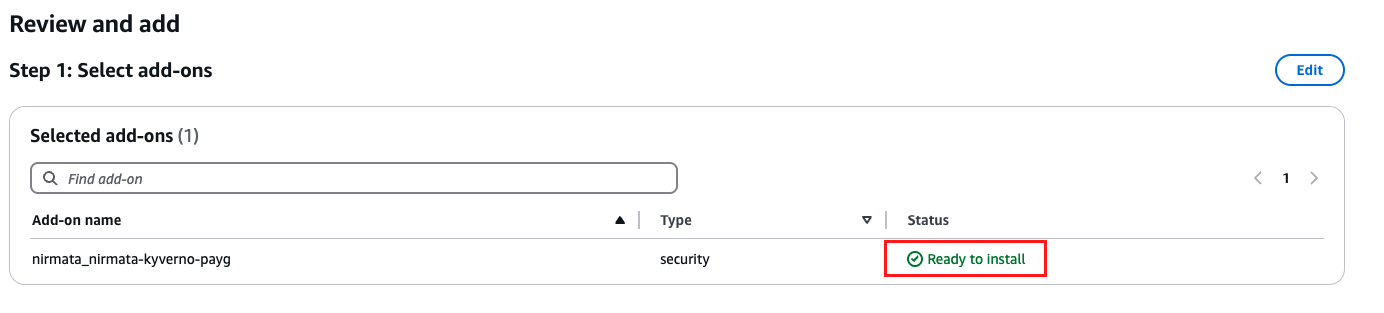
### Review and Add
1. Review the add-on configuration. The `Status` should be `Ready to Install`.
1. Click on Create.
## Verify Installation
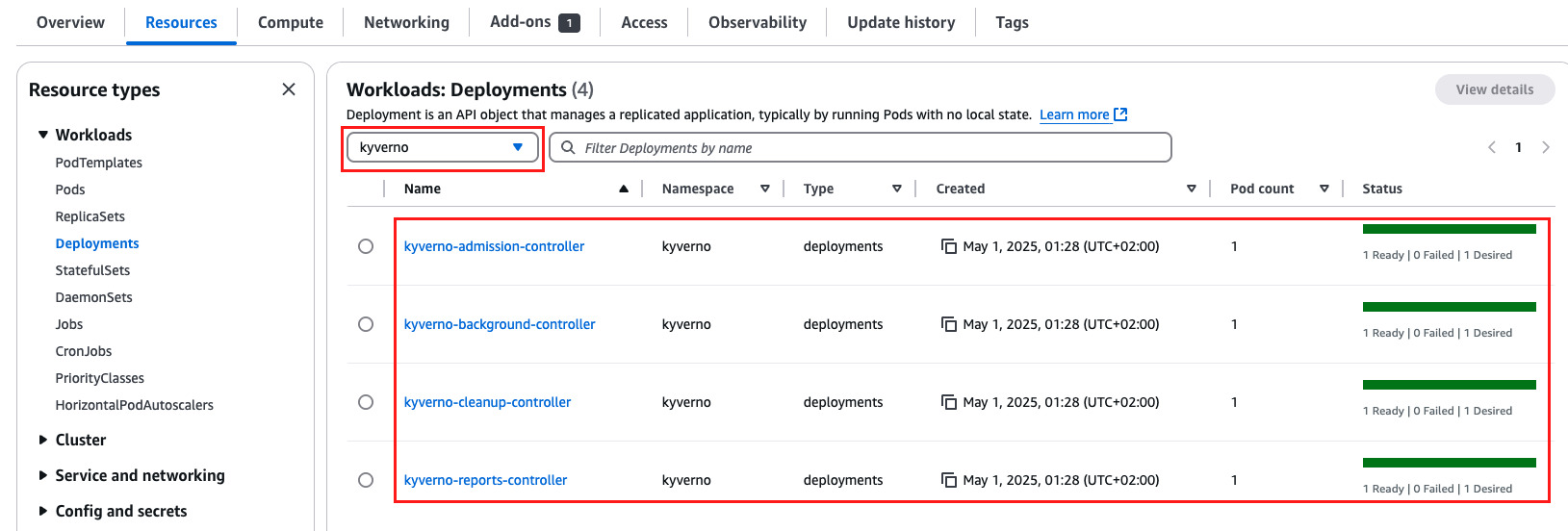
1. Go to _Cluster>Resources>Workloads>Deployments_.
1. Select `kyverno` namespace from the dropdown.
1. Verify that all four deployments are up and running.
## Installation via CLI
### Subscribe to Nirmata Enterprise for Kyverno in AWS Marketplace
>Note: This step needs to be done only once per AWS account.
1. Visit the [Nirmata Enterprise for Kyverno listing](https://aws.amazon.com/marketplace/pp/prodview-t44by22ed5wxi).
1. Click **Continue to Subscribe**.
1. Accept the terms to enable deployment into EKS.
### Set Variables
```bash
export CLUSTER_NAME=<your-cluster-name>
export CLUSTER_REGION=<your-cluster-region>
```text
### Associate IAM OIDC Provider
```bash
eksctl utils associate-iam-oidc-provider \
--cluster $CLUSTER_NAME \
--region $CLUSTER_REGION \
--approve
```text
This step allows Amazon EKS to map IAM roles to Kubernetes service accounts securely.
### Create IAM Service Account for Marketplace Metering
To enable AWS Marketplace metering for usage-based billing, Nirmata Enterprise for Kyverno requires permissions to report usage. These are provided via the managed policies:
* `AWSMarketplaceMeteringRegisterUsage`
* `AWSMarketplaceMeteringFullAccess`
Create the IAM service account:
```bash
eksctl create iamserviceaccount \
--name kyverno \
--namespace kyverno \
--cluster $CLUSTER_NAME \
--region $CLUSTER_REGION \
--attach-policy-arn arn:aws:iam::aws:policy/AWSMarketplaceMeteringRegisterUsage \
--attach-policy-arn arn:aws:iam::aws:policy/AWSMarketplaceMeteringFullAccess \
--approve \
--override-existing-serviceaccounts \
--role-only \
--role-name Nirmata Enterprise for Kyverno-PayG-Role
```text
This step ensures that Nirmata Enterprise for Kyverno can register and report usage data required for AWS billing. No other permissions are required.
### Install Nirmata Enterprise for Kyverno Add-on in the Cluster
To list available versions:
```bash
aws eks describe-addon-versions --addon-name nirmata_nirmata-kyverno-payg --query 'addons[].addonVersions[].addonVersion' --output text
```text
```bash
export SERVICE_ACCOUNT_ROLE_ARN=$(aws iam get-role --role-name Nirmata Enterprise for Kyverno-PayG-Role --output json | jq -r '.Role.Arn')
aws eks create-addon \
--cluster-name $CLUSTER_NAME \
--region $CLUSTER_REGION \
--addon-name nirmata_nirmata-kyverno-payg \
--addon-version <latest-version> \
--service-account-role-arn $SERVICE_ACCOUNT_ROLE_ARN \
--resolve-conflicts OVERWRITE
```text
### Verify Deployment
```bash
kubectl get pods -n kyverno
```text
## Upgrading the Add-on
To upgrade Nirmata Enterprise for Kyverno:
```bash
aws eks update-addon \
--cluster-name $CLUSTER_NAME \
--region $CLUSTER_REGION \
--addon-name nirmata_nirmata-kyverno-payg \
--addon-version <new-version>
Uninstalling Nirmata Enterprise for Kyverno
To remove the Nirmata Enterprise for Kyverno add-on and IAM service account:
aws eks delete-addon \
  --cluster-name $CLUSTER_NAME \
  --region $CLUSTER_REGION \
  --addon-name nirmata_nirmata-kyverno-payg

eksctl delete iamserviceaccount \
  --name kyverno \
  --namespace kyverno \
  --cluster $CLUSTER_NAME \
  --region $CLUSTER_REGION
Support
For assistance with setup or usage, contact Nirmata Support.
Feedback
Was this page helpful?
Glad to hear it! Please tell us how we can improve.
Sorry to hear that. Please tell us how we can improve.