---
title: "GitOps Integration"
description: "Contain steps to deploy policy exceptions through GitOps"
diataxis: how-to
applies_to:
product: "nirmata-control-hub"
audience: ["platform-engineer","devsecops"]
last_updated: 2026-04-16
url: https://docs.nirmata.io/docs/control-hub/policy-hub/policy-exceptions/gitops-deployment/
---
Policy exceptions can be managed and deployed using GitOps, similar to any other resource. Follow Nirmata Control Hub's request and approval workflow for creating and approving exceptions. The actual deployment of these exceptions will be handled through GitOps processes.
#### Managing Deployment Settings
An admin user can manage the deployment settings for Policy Exception Requests.
1. Go to **Settings** -> **Policy Exceptions** and click on the `Deployment` tab. The Settings page for Policy Exceptions deployment opens with `Automatic deployment` set as the default.
2. Click on the radio button beside `GitOps deployment`.
3. Enter the Git repository URL under `Git repository for policy exceptions` to provide a path for mapping the available clusters to a repository branch.
4. Map the clusters that are onboarded in Nirmata Control Hub to a branch in the Git repository. To do so:
a. Under `Cluster Expression to Branch Mappings`, select `cluster.label` or `cluster.name` from the dropdown.
b. If `cluster.label` is selected, choose the label from the dropdown.
c. Select the operator type from the dropdown. The available options are `in`, `exists`, and `contains`.
d. Select the operator value from the dropdown or enter it manually, then enter the repository branch name.
e. If `cluster.name` is selected, choose the operator type from the dropdown. The available options are `in` and `contains`.
f. Select the operator value from the dropdown or enter it manually, then enter the repository branch name.
g. Click the `+` button to add more cluster mappings.
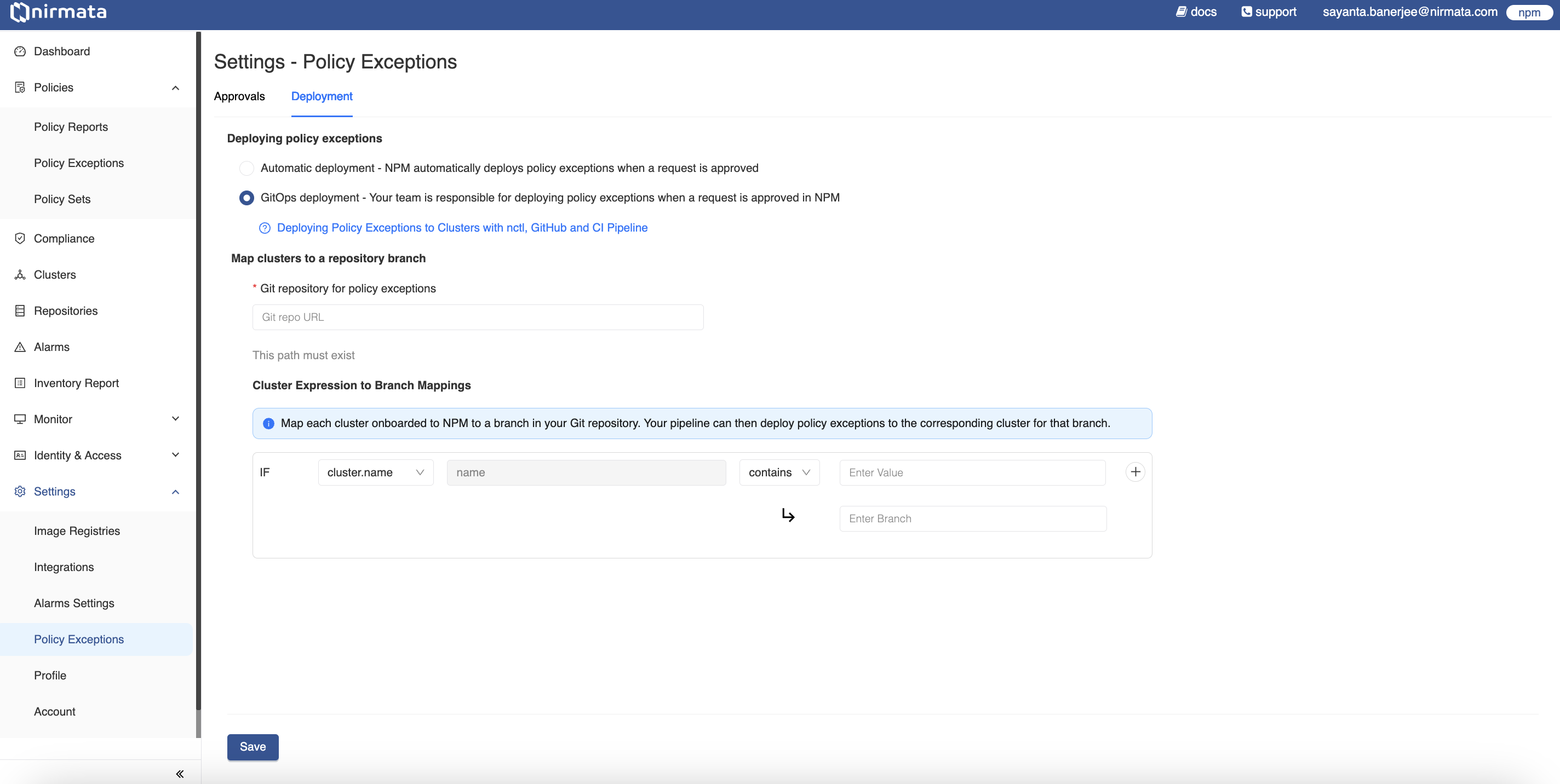
5. Finally, click **Save**.
### GitOps Deployment of Policy Exceptions in Action
`nctl` is required for creating Pull Requests for Policy Exception Requests. Learn more about installing nctl and its commands in the [official documentation](https://docs.nirmata.io/docs/nctl/getting-started/).
To deploy Policy Exceptions through GitOps:
1. Create a Policy Exception Request by following the steps [here](https://docs.nirmata.io/docs/control-hub/policy_exceptions/).
2. After the request is approved, a `Need to Deploy` message will appear under the **Deploy Status** section in Nirmata Control Hub.
3. In your local terminal, verify the created Policy Exception Request by executing:
```bash
nctl get policyexceptionrequest
```text
>NOTE: Login using the `nctl login npm` command to fetch policy exception requests from Nirmata Control Hub.
4. Now, create a pull request to deploy the Policy Exception by executing the following command:
This command will create PRs for all Policy Exception Requests that are in `Approved` state.
```bash
nctl create pull-request
```text
To create PR for a given Policy Exception Request, use the `--per-name` argument.
```bash
nctl create pull-request --per-name
```text
>NOTE: NCTL needs Git Personal Access Token (PAT) to be able to create pull requests on behalf of the user. Use the `nctl login github` command to set the Git login credentials.
>NOTE: The Git PAT should have write access to the repository. NCTL creates a temporary branch to commit the PolicyException YAML and then creates a PR to the relevant branch mapped in Nirmata Control Hub.
5. Once the PR is created, a team member can review and merge it into the repository. The Policy Exception will be deployed to the cluster according to your GitOps/pipeline workflow settings.
6. Verify the deployment by checking the Policy Exceptions in Nirmata Control Hub - you should see a `Create PR Created` message under the **Deploy Status** section.
7. When revoking a deployed Policy Exception, after revoking it from Nirmata Control Hub, create a PR using the same process to remove the PolicyException from the cluster.