
Shift Left with Remediation and Policy Exceptions
Overview
Shifting policy enforcement left means catching violations while code is still in a pull request, not after it reaches a cluster. In this workflow, every violation found by the CI pipeline gives the developer two next steps, both available from the pipeline summary:
- Fix it: the Nirmata remediator agent opens a pull request with the fix.
- Request an exception: the developer opens the finding in Nirmata Control Hub (NCH) and submits a policy exception request for review.
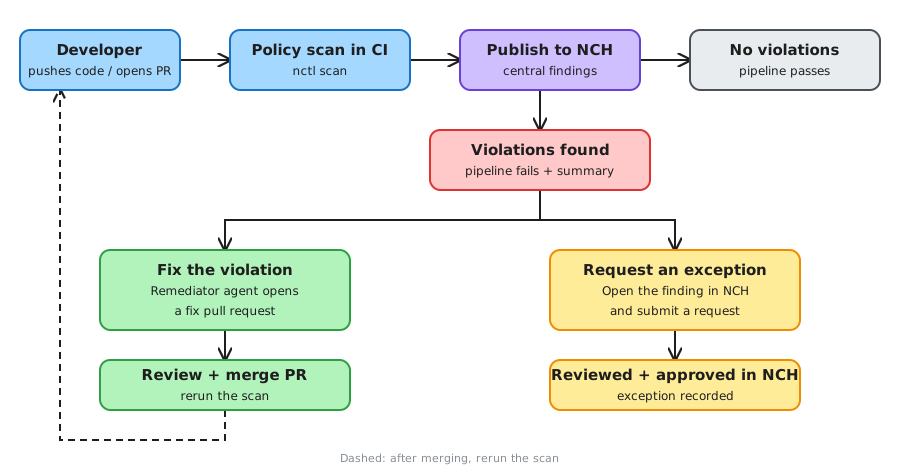
Scanning works with any CI system and most content types. Automated remediation currently supports YAML manifests and simple Helm charts (see the remediator support matrix); other content can still be scanned and can use the exception path. A reference implementation using GitHub Actions is available in the pipeline-scanning repository.
Benefits
| Benefit | How the workflow delivers it |
|---|---|
| Earlier feedback | Violations fail the pipeline on push or PR, before deployment. |
| Lower developer effort | The remediator agent generates the fix. Developers review and merge instead of researching the policy. |
| No local tooling | Both actions are links in the pipeline summary. Nothing to install. |
| Governed exceptions | Exceptions are requested against a specific finding in NCH, so they are tracked and reviewed instead of bypassed. |
| Central visibility | Scan results are published to NCH, giving platform and security teams one view across repositories. |
| Policy-as-code consistency | The same policies used for cluster admission are used in CI. |
| Reviewable changes | Fixes arrive as pull requests that go through your normal review process. |
Step 1: Scan and publish
A CI job runs on push, on pull requests, or manually. It:
- Scans the target content against your policies with
nctl scan. - Publishes the results to NCH so findings are visible centrally.
- Writes a pipeline summary that lists each violation with its policy, rule, and severity, plus two actions: Fix a violation and File an Exception.
- Fails the pipeline if any violation is found.
If nothing is found, the pipeline passes and no action is needed.
Step 2a: Fix with a remediation PR
Selecting Fix a violation starts a manually triggered job that runs the Nirmata remediator agent against the repository. The agent:
- Looks up the metadata for the selected policy.
- Generates the fix for the violating resources.
- Opens a pull request on a dedicated branch.
To launch it (GitHub Actions example):
- Select Fix a violation in the pipeline summary. This opens the remediation workflow page; it does not start a run.
- Select Run workflow.
- Choose the policy group to remediate, or all violations.
- Submit the run and wait for the agent to open the pull request.
Review and merge the PR, then rerun the scan. A fix scoped to one policy group does not resolve violations of other policies, so repeat the remediation or request an exception for anything that still fails.
Step 2b: Request a policy exception
When a violation is intentional, select File an Exception. The link opens the finding for the repository in NCH (log in first if needed). Submit an exception request for the finding so the policy owner can review and approve it. Approved exceptions are recorded in NCH rather than silently bypassed.