Nirmata Assistant
Security-first CLI agent for policy development, testing, cluster management, and Kubernetes operations — with built-in session management and 15+ specialized skills.
Service Agents
Autonomous agents deployed inside your clusters that continuously detect violations and open GitOps PRs to remediate them.
Cloud Agents
On-demand and scheduled AI agents for cost analysis, security auditing, workload troubleshooting, and remediation — launched directly from Nirmata Control Hub.
Copilot
Context-aware AI embedded in Nirmata Control Hub that provides intelligent insights and recommendations using your full platform context and data.
## Key Benefits
### Accelerate Development & Operations
* **Save Time** – Reduce time spent on policy creation, troubleshooting, and remediation from days and hours to minutes with AI-guided workflows
* **Faster Issue Resolution** – Get instant answers and automated fixes instead of searching through documentation or waiting for support
* **Accelerated Onboarding** – New team members become productive faster with AI-powered guidance and contextual recommendations
### Reduce Costs & Maximize Efficiency
* **Do More with Less** – Empower smaller teams to manage larger, more complex platforms and environments
* **Lower Operational Costs** – Automated remediation and policy enforcement reduce manual intervention and operational overhead
* **Cost-Effective AI** – Optimized for accuracy and low cost, delivering reliable results without excessive token consumption or API expenses
### Improve Security & Compliance
* **Shift Left with Confidence** – Catch security and compliance issues during development before they reach production
* **Continuous Enforcement** – Automated policy enforcement ensures consistent governance across all environments 24/7
* **Reduce Risk** – Proactive detection and remediation minimize security vulnerabilities and compliance violations
### Enhance Accuracy & Reliability
* **High Accuracy** – Purpose-built AI models trained specifically for Kubernetes and cloud-native environments
* **Context-Aware Decisions** – Leverages your cluster state, policies, and organizational context for precise recommendations
* **Trusted Automation** – Validated workflows ensure changes are safe and aligned with best practices
### Scale Platform Engineering
* **Unified Governance** – Single framework spanning CLI, clusters, and cloud for consistent policy enforcement everywhere
* **Self-Service Capabilities** – Developers get instant feedback and guidance without depending on platform teams
* **Knowledge Democratization** – Share expertise across teams through AI-powered best practices and automation
---
## Nirmata Assistant
> **Applies to:** nctl 4.0 and later
The Nirmata Personal Agent (`nctl ai`) runs on your workstation and integrates directly into your development workflow, offering specialized guidance and automation without requiring a dedicated server.
`nctl ai` is built with a security-first design — it only accesses directories you explicitly allow, loads built-in skills and only the skills you provide (with `--skills`), and asks for your confirmation before performing any operation. See [Security](security/) for details.
## Step-by-Step Install
Install `nctl` using Homebrew:
```sh
brew tap nirmata/tap
brew install nctl
```
For more installation options, see [nctl installation](https://downloads.nirmata.io/nctl/downloads/).
Run the personal agent in interactive mode:
```sh
nctl ai
```
You will be prompted to enter your business email to:
- sign up for a free trial
- or sign in to your account
```sh
Using nctl AI requires authentication with Nirmata Control Hub to access
AI-enabled services. Please enter your business email to sign up for a
free trial, or sign in to your account
Enter email: ****@******.com
A verification code has been sent to your email.
Enter verification code: ******
Email verified successfully!
Your credentials have been fetched and successfully saved.
👋 Hi, I am your Nirmata AI Platform Engineering Assistant!
I can help you automate security, compliance, and operational best practices
across your clusters and pipelines.
💡 Here are some tasks I can do for you, or ask anything:
▶ scan clusters
▶ generate policies and tests
▶ optimize costs
💡 type 'help' to see commands for working in nctl ai
───────────────────────────────────────────────────────────────────────────────────────
>
───────────────────────────────────────────────────────────────────────────────────────
```
Try some sample prompts like:
* scan my cluster
* generate a policy to require pod labels
* summarize violations across my clusters
* perform a Kyverno health check
**Non-Interactive Mode**:
You can also provide a prompt directly for single shot requests:
```bash
nctl ai --prompt "create a policy that requires all pods to have resource limits"
```
See [Command Reference](/docs/nctl/commands/nctl_ai/) for full details.
## Accessing Nirmata Control Hub
After successful authentication, you can also access the Nirmata Control Hub web interface:
1. Navigate to https://nirmata.io
2. Use the same email address you provided during nctl setup
3. Use the password you created in the authentication process
Alternatively, you can sign up for a [15-day free trial](https://nirmata.io/security/signup-pa.html) and log in manually using the CLI:
```bash
nctl login --userid YOUR_USER_ID --token YOUR_API_TOKEN
```
## Key Capabilities
`nctl ai` is a personal agent specializing in Kubernetes, Policy as Code and Platform Engineering.
It provides comprehensive support across these domains:
### Policy as Code
- Generate Kyverno policies from natural language descriptions
- Create and execute comprehensive Kyverno CLI and Chainsaw tests
- Generate policy exceptions for failing workloads
- Upgrade Kyverno policies from older versions to CEL
- Convert policies from OPA/Sentinel to Kyverno
### Platform Engineering
- Troubleshoot Kyverno engine, webhook, and controller issues
- Get policy recommendations for your environments
- Manage compliance across clusters
- Manage Nirmata agents across your clusters
- Install and configure Kyverno and other controllers
## Available Tools
The agent has access to tools for command execution, Kyverno and policy workflows, file system operations, Slack and email, and task management. See the [Available Tools](/docs/ai/nctl-ai/tools/) reference for the full list in a searchable table.
**Examples:**
List Slack channels:
```bash
nctl ai --prompt "list my slack channels"
```
Send a message to a channel:
```bash
nctl ai --prompt "scan my cluster and send the report to dev-general channel"
```
## Available Skills
`nctl ai` loads specialized skills dynamically based on your task (policy generation, cluster assessment, troubleshooting, cost management, and more). See the [Available Skills](/docs/ai/nctl-ai/skills/) reference for the full list in a table.
### Skills Safety
Built-in skills are curated and safe. They require read-only permissions and do not write to external URLs. They follow all security best practices.
You can also [add your own skills](extend/#adding-custom-skills) to customize the agent.
## Command Reference
The authoritative reference for `nctl ai` flags and examples is the [nctl ai command documentation](/docs/nctl/commands/nctl_ai/). That page is maintained to match the CLI.
- **In interactive mode:** type `help` for a full list of commands and capabilities.
- **From the terminal:** run `nctl ai --help` for the latest usage, examples, and flags from your installed version.
## More Topics
| Topic | Description |
|-------|-------------|
| [Security](security/) | Filesystem sandboxing, permission checks, and automation flags |
| [Session & Task Management](session-management/) | Sessions, task tracking, execution limits, and plan mode |
| [AI Provider Configuration](providers/) | Nirmata, Anthropic, Gemini, Azure OpenAI, and Bedrock |
| [Extending Nirmata Assistant](extend/) | MCP servers, custom skills, and running as an MCP server |
---
## AI Copilot
## Overview
AI Copilot is an intelligent assistant specialized in Kubernetes policies, security, governance, and Policy as Code with access to live data from your Nirmata environment. The Copilot combines deep technical knowledge with real-time insights to provide actionable guidance for security, compliance, and policy management.
### Key Capabilities
**Kubernetes & Container Security**
- **Policy Creation & Management**: Write, validate, and optimize Kyverno policies
- **Security Posture Analysis**: Assess and improve cluster security configurations
- **Resource Management**: Analyze deployments, pods, services, and other K8s resources
- **YAML/JSON Configuration**: Generate and troubleshoot configuration files
- **Container Security**: Best practices for images, runtime security, and hardening
**Policy as Code Expertise**
- **Kyverno Policies**: Validation, mutation, and generation patterns
- **Compliance Frameworks**: CIS benchmarks, PCI DSS, SOC 2, NIST
- **GitOps Integration**: Policy deployment and management workflows
- **Multi-cluster Management**: Cross-cluster policy consistency and governance
**Live Environment Analysis**
- **Real-time Violation Detection**: Identify and prioritize security issues
- **Audit Trail Analysis**: Track policy changes and remediation progress
- **Resource Discovery**: Find and analyze specific resources across clusters
- **Trend Analysis**: Historical security posture improvements
### Problem-Solving Approach
The AI Copilot follows an autonomous analysis approach:
**Proactive Investigation**
- Uses available tools to gather context without requiring explicit requests
- Considers multiple approaches (3-5 different solutions) before making recommendations
- Performs root cause analysis for policy violations and configuration issues
**Practical Guidance**
- Provides step-by-step remediation instructions
- Includes ready-to-use YAML, JSON, and Dockerfile code examples
- Recommends industry-standard security and compliance best practices
- Prioritizes high-impact, low-effort improvements
### Specialized Knowledge Areas
**Security & Compliance**
- Runtime security and admission control
- Network policies and micro-segmentation
- Identity and access management (RBAC, service accounts)
**DevOps & GitOps**
- CI/CD pipeline security integration
- Infrastructure as Code (IaC) scanning
- Policy automation and deployment
- Monitoring and alerting strategies
**Troubleshooting & Optimization**
- Policy conflict resolution
- Performance impact analysis
- Resource optimization recommendations
- Incident response and remediation
## Using Copilot - Available Tools
AI Copilot has access to 8 specialized tools that interact with your Nirmata environment and provide real-time insights:
### Security & Policy Analysis Tools
#### getPolicyResultsSummary
Get live security posture across your environment.
- **Returns**: Current violations grouped by policy and rule
- **Filters**: Can focus on specific namespaces, source IDs, or source types (k8s/git-repository)
- **Use Cases**:
- "Show me all current security violations"
- "What's the security state of my production namespace?"
- "Which policies are failing most frequently?"
#### getViolationAuditLog
Historical view of security posture changes.
- **Returns**: Aggregated changes over time (remediated, new violations, etc.)
- **Time Range**: Configurable (hours to days in ISO-8601 format like PT24H or P5D)
- **Filters**: Can focus on specific policies, sources, or source types
- **Use Cases**:
- "What security improvements were made this week?"
- "Track remediation progress over the last month"
- "Show violation trends for specific policies"
### Infrastructure Discovery Tools
#### listClusters
Inventory of all managed Kubernetes clusters.
- **Features**: Pagination support, name filtering (partial match)
- **Returns**: Cluster names, IDs, and metadata
- **Use Cases**:
- "Show me all clusters in the environment"
- "Find clusters with names containing 'prod'"
#### listNamespaces
List namespaces within a specific cluster.
- **Features**: Pagination, requires cluster name/ID
- **Returns**: Namespace inventory for targeted cluster analysis
- **Use Cases**:
- "What namespaces exist in my production cluster?"
- "Show me namespace organization across clusters"
#### listPolicies
Catalog of all deployed policies.
- **Features**: Filter by cluster IDs, pagination support
- **Returns**: Policy names, categories, annotations, and metadata
- **Use Cases**:
- "What policies are deployed across my environment?"
- "Show me security policies for specific clusters"
#### listRepositories
Inventory of linked code and image repositories.
- **Features**: Pagination support for large repository lists
- **Returns**: Repository information tied to policy scans
- **Use Cases**:
- "What repositories are being scanned for policy violations?"
- "Show me all connected Git repositories"
### Resource Search & Analysis Tools
#### searchResource
Find and analyze specific Kubernetes resources.
- **Search Criteria**: Resource name (partial match), resource type, scope
- **Scope Options**:
- Repository + Branch
- Cluster + Namespace
- Cloud + Account + Service + Region
- **Resource Types**: Pods, Deployments, Services, ConfigMaps, etc.
- **Use Cases**:
- "Find all nginx deployments in production"
- "Locate ConfigMaps with sensitive data"
- "Search for specific resources causing violations"
#### get_current_page_context
Understand what you're currently viewing in the UI.
- **Returns**: Scraped browser context (can be verbose)
- **Best Used**: When context about your current dashboard view is needed
- **Use Cases**:
- "Analyze the violations shown on my current page"
- "Help with what I'm currently looking at"
- "Provide context-specific recommendations"
### Common Tool Combinations
**Complete Security Assessment**
1. `listClusters` → Get environment overview
2. `getPolicyResultsSummary` → Current violation state
3. `getViolationAuditLog` → Historical trends
4. `searchResource` → Investigate specific issues
**Policy Troubleshooting**
1. `listPolicies` → Find relevant policies
2. `getPolicyResultsSummary` → See current failures
3. `searchResource` → Locate affected resources
4. `get_current_page_context` → Understand your current view
**Remediation Tracking**
1. `getViolationAuditLog` → Baseline violations
2. `getPolicyResultsSummary` → Current state
3. Comparison analysis for progress measurement
### Autonomous Tool Usage
AI Copilot uses these tools proactively when you ask questions:
- Automatically determines which tools provide the needed information
- Calls multiple tools in sequence to build complete context
- Analyzes data across tools to provide comprehensive answers
- Does not require permission before using tools (unless missing required parameters)
**Key Advantages:**
- **Real-time Data**: All tools provide live environment data
- **Cross-correlation**: Combines data from multiple tools for deeper insights
- **Contextual Intelligence**: Tools work together to understand your specific situation
- **Actionable Results**: Data is immediately usable for decision-making
## Conversations
### Starting a New Conversation
To start a new conversation with AI Copilot:
1. Navigate to the **AI Copilot** section in Nirmata Control Hub
2. Click the **New Chat** button or icon
3. Type your question or request in the input field
4. Press Enter or click Send
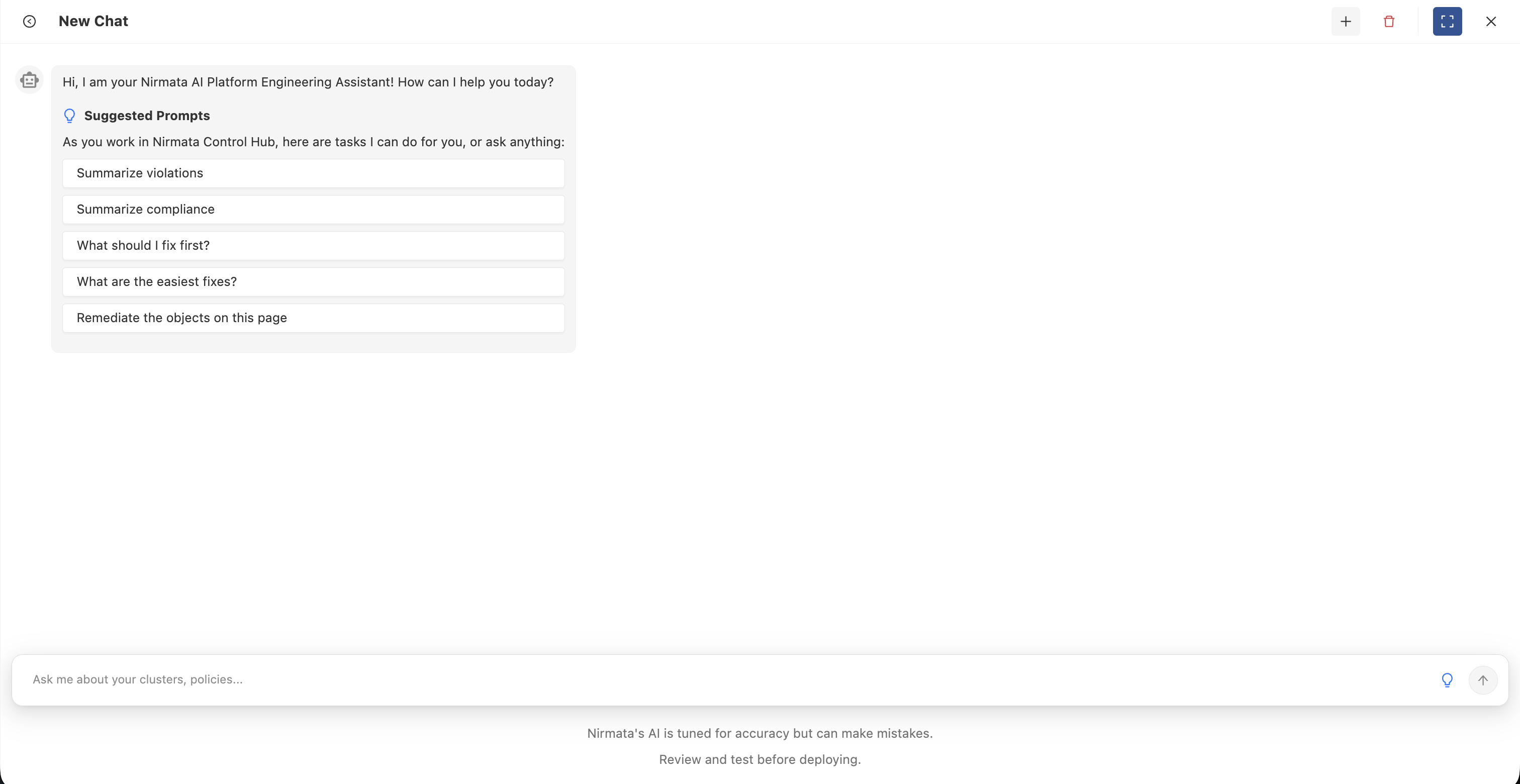
The Copilot will analyze your request and use its available tools to gather relevant information from your environment before providing a comprehensive response.
**Example Questions:**
- "Show me all current security violations in my production cluster"
- "What policies are failing most frequently?"
- "Help me write a Kyverno policy to restrict privileged containers"
- "Track remediation progress over the last week"
- "What are the easiest fixes I can make right now?"
### Conversation History
AI Copilot maintains a history of your conversations for easy reference:
- **Access History**: Click on the conversation history icon or sidebar to view past conversations
- **Resume Conversations**: Click on any previous conversation to continue where you left off
- **Search Conversations**: Use the search functionality to find specific topics or questions
- **Context Preservation**: Each conversation maintains its context, allowing for follow-up questions
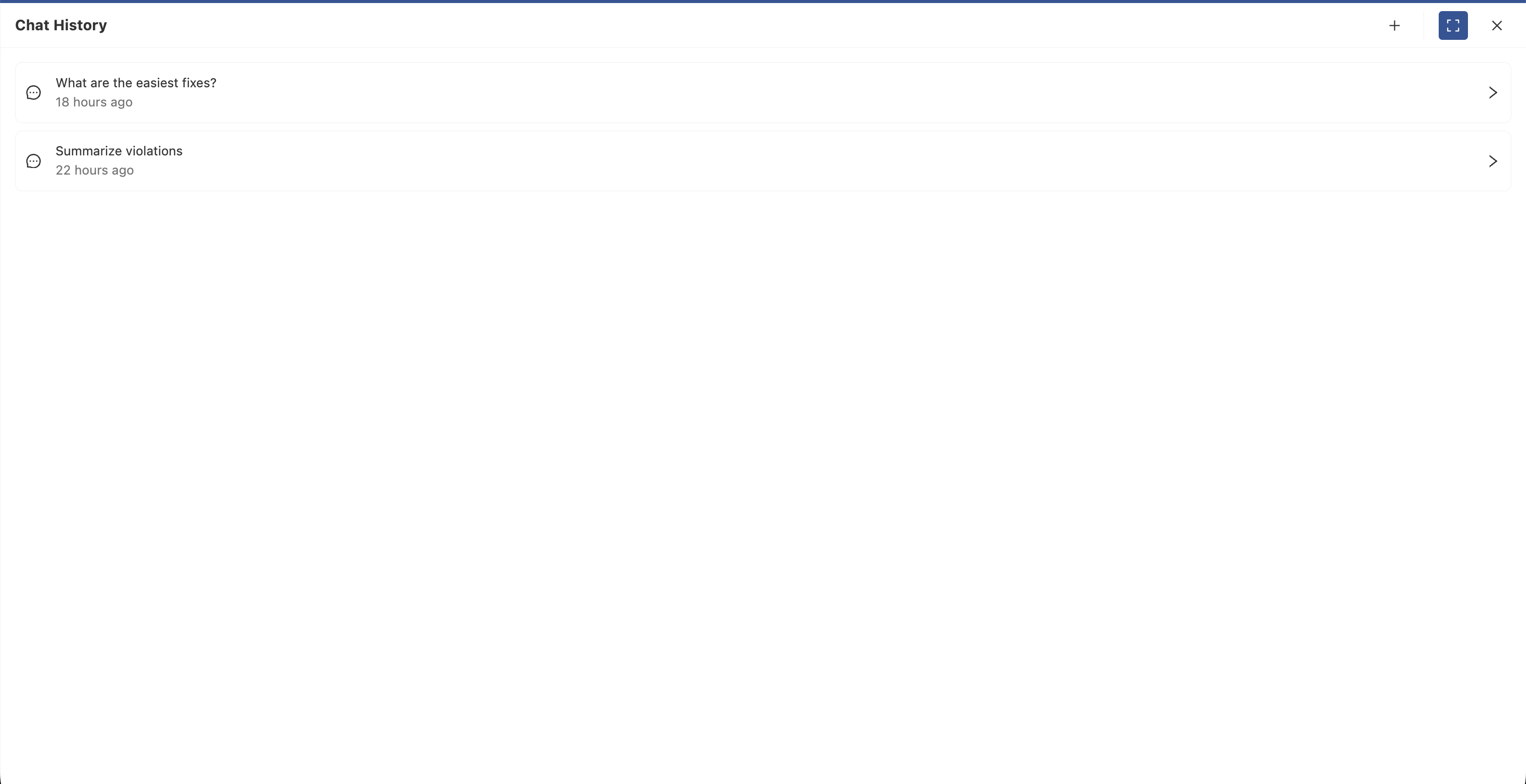
Conversation history helps you:
- Track your security improvement journey
- Reference previous recommendations and solutions
- Build on earlier discussions without repeating context
- Share insights with team members
### Delete Conversation
To delete a conversation:
1. Navigate to your conversation history
2. Find the conversation you want to delete
3. Click the delete icon (typically a trash can or X icon) next to the conversation
4. Confirm the deletion when prompted
**Note**: Deleted conversations cannot be recovered. Consider exporting important information before deleting.
### Best Practices
**Ask Specific Questions**
- Instead of "Are there any issues?", ask "What security violations exist in my production namespace?"
- Provide context about what you're trying to accomplish
**Use Natural Language**
- The Copilot understands conversational queries
- No need to use specific command syntax
**Leverage Context Awareness**
- When viewing a specific dashboard or report, ask "What should I fix first on this page?"
- The Copilot can see your current view and provide targeted recommendations
**Follow-up Questions**
- Ask clarifying questions to dig deeper
- Request code examples, step-by-step instructions, or alternative approaches
**Combine Multiple Requests**
- "Show me all violations in the production cluster and suggest which ones to fix first"
- The Copilot will automatically use multiple tools to provide comprehensive answers
## Monitor AI Usage
All AI Copilot interactions consume AI credits from your monthly allocation. You can monitor your usage and track conversations in the AI Usage section.
To check your AI usage:
1. Navigate to **Settings > Account**
2. Click on the **AI Usage** tab
3. View your usage metrics including:
- Total tokens consumed
- Remaining credits for the current billing period
- Detailed conversation history with token counts
For complete details about AI usage tracking and metrics, see the [AI Usage documentation]({{< relref "/docs/control-hub/Settings/Account" >}}).
---
## Cloud Agents
Cloud Agents are AI-powered workflows you launch on-demand or on a schedule from Nirmata Control Hub. Each agent runs as a short-lived job, executes a specific analysis or remediation task against a target cluster or resource, and produces a detailed report — with no persistent infrastructure required.
Unlike [Service Agents](/docs/ai/service-agents/), which run continuously inside your cluster, Cloud Agents are ephemeral: they spin up, do their work, and terminate. You get the results without any long-running footprint.
## Use Cases
| Task | Example Agents |
|------|----------------|
| **Cost optimization** | Identify over-provisioned workloads, right-size resources, flag unused namespaces |
| **Security auditing** | Scan RBAC configuration, detect privilege escalation paths, audit image provenance |
| **Compliance** | Generate compliance reports mapped to CIS, NIST, or SOC 2 controls |
| **Policy recommendations** | Analyze cluster state and recommend Kyverno policies to apply |
| **Workload troubleshooting** | Diagnose failing pods, OOMKills, and misconfigured resource limits |
| **Remediation** | Apply approved fixes to policy violations across namespaces |
## How They Work
1. **Select an agent** from the Agent Catalog — each entry describes what the agent does, what inputs it needs, and what cluster permissions it requires.
2. **Provide inputs** — choose a target cluster, namespace, or other parameters specific to the agent.
3. **Launch or schedule** — run immediately, or configure a recurring schedule (hourly, daily, weekly, or custom cron).
4. **Review results** — each completed run produces a structured report you can view, share, or download. Live logs are available for runs in progress.
## Agent Types
| Type | Description |
|------|-------------|
| **Workflow** | Multi-step agents where steps execute sequentially or in parallel. Progress is visible step-by-step in real time. |
| **Task** | Single-operation agents that execute one focused function and return a report on completion. |
## Trigger Sources
Runs can be initiated in multiple ways — not just manually:
| Source | Description |
|--------|-------------|
| Manual | Launched directly from the Agent Catalog |
| Schedule | Triggered automatically by a configured recurring schedule |
| Copilot | Launched by the Nirmata Control Hub Copilot in response to a request |
| Webhook | Triggered by an external event (e.g., a GitHub PR or Jira issue) |
| Event | Triggered as a follow-on from another agent run |
## Using Cloud Agents
Cloud Agents are managed from **Agent Hub** in Nirmata Control Hub.
[Go to Cloud Agents in Agent Hub →](/docs/control-hub/agent-hub/cloud-agents/)
---
## Service Agents
Service Agents are autonomous AI agents deployed directly inside your Kubernetes clusters. They run continuously — watching for policy violations, generating AI-powered remediation plans, and creating pull requests in your Git repositories to fix them — without requiring any manual intervention.
Unlike [Cloud Agents](/docs/ai/cloud-agents/), which are ephemeral jobs you launch on-demand from Nirmata Control Hub, Service Agents are long-running deployments that operate on a schedule or respond to events in real time.
## The Remediator Agent
The primary Service Agent is the **Remediator Agent**. It connects Kyverno's policy enforcement with your GitOps workflow:
1. Kyverno detects a policy violation and writes it to a `ClusterPolicyReport`.
2. The Remediator Agent reads the report and calls an AI model (Nirmata AI, AWS Bedrock, or Azure OpenAI) to generate a compliant fix.
3. The agent opens a pull request in the target Git repository with the proposed change.
4. A human reviews and merges the PR — the agent never bypasses branch protection or pushes directly.
## Use Cases
| Scenario | How It Helps |
|----------|-------------|
| **Continuous compliance** | Fix policy violations within hours rather than days — on a recurring schedule |
| **Multi-cluster governance** | Manage hundreds of clusters from a single ArgoCD hub without proportional team growth |
| **Shift-left feedback loop** | Developers see auto-generated fix PRs alongside violation alerts — no need to look up how to fix them |
| **Audit-ready remediation** | Every fix is a Git commit with a PR — a complete, reviewable audit trail |
| **Selective automation** | Configure the agent to only open PRs when it's highly confident, or for all findings |
## How Confidence Works
When the AI generates a fix, it assigns a confidence level:
| Level | Meaning |
|-------|---------|
| **High** | The fix is straightforward and the AI is highly confident it is correct and safe |
| **Low** | The AI identified a potential fix but recommends human review before merging |
You can configure the agent to create PRs only for high-confidence fixes, only for low-confidence (for review), or both. This gives you control over how much automation you want in your workflow.
## GitOps Integration
Service Agents are designed to work with your existing GitOps workflow — not replace it:
- All changes are proposed as pull requests, not applied directly
- PR branch names, titles, and labels are fully configurable
- A single PR can cover multiple violations; the [Split PR](/docs/control-hub/agent-hub/service-agents/configuration/#split-pr) feature lets you break it apart for independent review
- The agent monitors open PRs for comments, responding to `@nirmatabot` commands
## Deploy and Configure
Service Agents are installed via Helm and configured through Kubernetes custom resources.
[Get Started with Service Agents →](/docs/control-hub/agent-hub/service-agents/getting-started/)